] status5 Working with Julia: The REPL, Packages, and Introspection
5.1 Official Documentation
The official Julia documentation https://docs.julialang.org/ contains several overviews, including:
- https://docs.julialang.org/en/v1/base/punctuation/ List of symbols
- https://docs.julialang.org/en/v1/manual/unicode-input/ List of special Unicode symbols and their input methods via tab completion in Julia
- https://docs.julialang.org/en/v1/manual/mathematical-operations/#Rounding-functions List of mathematical functions
5.2 Julia REPL (Read - Eval - Print - Loop)
After starting Julia in a terminal, you can enter both Julia code and various commands:
| Command | Action |
|---|---|
exit() or Ctrl-d |
exit Julia |
Ctrl-c |
interrupt |
Ctrl-l |
clear screen |
End command with ; |
suppress output |
include("filename.jl") |
read and execute file with Julia code |
The REPL supports several modes:
| Mode | Prompt | Start mode | Exit mode |
|---|---|---|---|
| default | julia> |
Ctrl-d (exits Julia) |
|
| Package manager | pkg> |
] |
backspace |
| Help | help?> |
? |
backspace |
| Shell | shell> |
; |
backspace |
5.3 Jupyter Notebooks (IJulia)
In a Jupyter notebook, the modes are usable as single-line commands in their own input cells:
- a package manager command:
- a help query:
?sin- a shell command:
;ls5.4 The Package Manager
An important part of the Julia ecosystem is the extensive collection of packages that extend Julia’s functionality.
- Some packages are part of every Julia installation and only need to be activated with
using Packagename.- They form the so-called standard library, which includes
LinearAlgebra,Statistics,SparseArrays,Printf,Pkg, and others.
- Over 10000 packages are officially registered, see https://julialang.org/packages/.
- These can be downloaded and installed with just a few keystrokes using the package manager
Pkg. Pkgcan be called in two ways:- as normal Julia statements that can also be in a
.jlprogram file:
using Pkg Pkg.add("PackageXY")- in the special pkg-mode of the Julia REPL:
] add PackageXY- as normal Julia statements that can also be in a
- Afterward, the package can be used with
using PackageXY.
- These can be downloaded and installed with just a few keystrokes using the package manager
- You can also install packages from other sources and self-written packages.
5.4.1 Some Package Manager Functions
| Function | pkg - Mode |
Explanation |
|---|---|---|
Pkg.add("PackageXY") |
pkg> add PackageXY |
add to current environment |
Pkg.rm("PackageXY") |
pkg> remove PackageXY |
remove from current environment |
Pkg.update() |
pkg> update |
update packages in current environment |
Pkg.activate("mydir") |
pkg> activate mydir |
activate directory as current environment |
Pkg.status() |
pkg> status |
list packages |
Pkg.instantiate() |
pkg> instantiate |
install all packages according to Project.toml |
5.4.2 Installed Packages and Environments
- Julia’s package manager maintains:
- a list of packages explicitly installed with the command
Pkg.add()or]addwith exact version specifications in a fileProject.tomland - a list of all packages installed as implicit dependencies in the file
Manifest.toml.
- a list of packages explicitly installed with the command
- The directory in which these files are located is the
environmentand is displayed withPkg.status()or]status. - Without an expplicit project environment, this looks as follows:
(@v1.10) pkg> status
      Status `~/.julia/environments/v1.12/Project.toml`
  [6e4b80f9] BenchmarkTools v1.6.3
  [5fb14364] OhMyREPL v0.5.29
  [91a5bcdd] JuliaFormatter v2.3.0
[295af30f] Revise v3.13.2- You can use separate
environmentsfor different projects. You can either start Julia with
julia --project=path/to/myprojector activate the environment in Julia with Pkg.activate("path/to/myproject"). Then Project.toml and Manifest.toml files are created and managed there. (The installation of package files still takes place somewhere under $HOME/.julia)
5.4.3 Installing Packages on our Jupyter Server misun103:
- A central repository already contains all packages mentioned in this course.
- You have no write permissions there.
- However, you can install additional packages in your
HOME. As a first command, you need to activate the current directory:
] activate .(Note the dot!)
After that, you can install packages with add in the pkg-mode:
] add PackageXYPackage installation can take a significant amount of time. Many packages have complex dependencies and trigger the installation of further packages. Many packages are precompiled during installation. You can see the installation progress in the REPL, but unfortunately not in the Jupyter notebook.
5.5 The Julia JIT (just in time) Compiler: Introspection
The Julia compiler is based on the LLVM Compiler Infrastructure Project.
Stages of Compilation
| stage & result | introspection command |
|---|---|
| Parse \(\Longrightarrow\) Abstract Syntax Tree (AST) | Meta.parse() |
| Lowering: transform AST \(\Longrightarrow\) Static Single Assignment (SSA) form | @code_lowered |
| Type Inference | @code_warntype, @code_typed |
| Generate LLVM intermediate representation | @code_llvm |
| Generate native machine code | @code_native |
function f(x,y)
    z = x^2 + log(y)
    return 2z
end
f (generic function with 1 method)p = Meta.parse( "function f(x,y); z=x^2+log(y); return 2x; end"):(function f(x, y)
#= none:1 =#
#= none:1 =#
z = x ^ 2 + log(y)
#= none:1 =#
return 2x
end)using TreeView
walk_tree(p)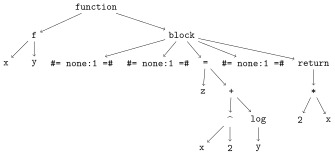
Error showing value of type TreeView.LabelledTree
StackOverflowError:
Stacktrace:
 [1] show(io::IOContext{IOBuffer}, x::LabelledTree) (repeats 79983 times)
   @ Main.Notebook ~/Julia/Book26/JuliaBook/chapters/5_TricksHelp.qmd:26
@code_lowered f(2,4)CodeInfo(
1 ─ %1 = Main.Notebook.:+
│ %2 = Main.Notebook.:^
│ %3 = builtin Core.apply_type(Base.Val, 2)
│ %4 = dynamic (%3)()
│ %5 = dynamic Base.literal_pow(%2, x, %4)
│ %6 = Main.Notebook.log
│ %7 = dynamic (%6)(y)
│ z = (%1)(%5, %7)
│ %9 = Main.Notebook.:*
│ %10 = z
│ %11 = dynamic (%9)(2, %10)
└── return %11
)@code_warntype f(2,4)MethodInstance for Main.Notebook.f(::Int64, ::Int64)
from f(x, y) @ Main.Notebook ~/Julia/Book26/JuliaBook/chapters/5_TricksHelp.qmd:222
Arguments
#self#Warning: detected a stack overflow; program state may be corrupted, so further execution might be unreliable.
StackOverflowError:
Stacktrace:
[1] show(io::IOBuffer, x::Core.Const) (repeats 79984 times)
@ Main.Notebook ~/Julia/Book26/JuliaBook/chapters/5_TricksHelp.qmd:26
Error showing value of type StackOverflowError
StackOverflowError:
Stacktrace:
[1] show(io::IOContext{IOBuffer}, x::StackOverflowError) (repeats 79983 times)
@ Main.Notebook ~/Julia/Book26/JuliaBook/chapters/5_TricksHelp.qmd:26@code_typed f(2,4)CodeInfo(
1 ─ %1 = intrinsic Base.mul_int(x, x)::Int64
│ %2 = intrinsic Base.sitofp(Float64, y)::Float64
│ %3 = invoke Base.Math.log(%2::Float64)::Float64
│ %4 = intrinsic Base.sitofp(Float64, %1)::Float64
│ %5 = intrinsic Base.add_float(%4, %3)::Float64
│ %6 = intrinsic Base.mul_float(2.0, %5)::Float64
└── return %6
) => Float64@code_llvm f(2,4); Function Signature: f(Int64, Int64)
; @ /home/hellmund/Julia/Book26/JuliaBook/chapters/5_TricksHelp.qmd:222 within `f`
define double @julia_f_11726(i64 signext %"x::Int64", i64 signext %"y::Int64") #0 {
top:
; @ /home/hellmund/Julia/Book26/JuliaBook/chapters/5_TricksHelp.qmd:223 within `f`
; ┌ @ intfuncs.jl:437 within `literal_pow`
; │┌ @ int.jl:88 within `*`
%0 = mul i64 %"x::Int64", %"x::Int64"
; └└
; ┌ @ math.jl:1544 within `log`
; │┌ @ float.jl:378 within `float`
; ││┌ @ float.jl:352 within `AbstractFloat`
; │││┌ @ float.jl:245 within `Float64`
%1 = sitofp i64 %"y::Int64" to double
; │└└└
; │ @ math.jl:1546 within `log`
%2 = call double @j_log_11729(double %1)
; └
; ┌ @ promotion.jl:433 within `+`
; │┌ @ promotion.jl:404 within `promote`
; ││┌ @ promotion.jl:379 within `_promote`
; │││┌ @ number.jl:7 within `convert`
; ││││┌ @ float.jl:245 within `Float64`
%3 = sitofp i64 %0 to double
; │└└└└
; │ @ promotion.jl:433 within `+` @ float.jl:495
%4 = fadd double %2, %3
; └
; @ /home/hellmund/Julia/Book26/JuliaBook/chapters/5_TricksHelp.qmd:224 within `f`
; ┌ @ promotion.jl:434 within `*` @ float.jl:497
%5 = fmul double %4, 2.000000e+00
; └
ret double %5
}@code_native f(2,4) .text
.file "f"
.section .ltext,"axl",@progbits
.globl julia_f_11843 # -- Begin function julia_f_11843
.p2align 4, 0x90
.type julia_f_11843,@function
julia_f_11843: # @julia_f_11843
; Function Signature: f(Int64, Int64)
; ┌ @ /home/hellmund/Julia/Book26/JuliaBook/chapters/5_TricksHelp.qmd:222 within `f`
# %bb.0: # %top
#DEBUG_VALUE: f:x <- $rdi
#DEBUG_VALUE: f:y <- $rsi
push rbp
mov rbp, rsp
push rbx
push rax
mov rbx, rdi
; │ @ /home/hellmund/Julia/Book26/JuliaBook/chapters/5_TricksHelp.qmd:223 within `f`
; │┌ @ intfuncs.jl:437 within `literal_pow`
; ││┌ @ int.jl:88 within `*`
imul rbx, rdi
; │└└
; │┌ @ math.jl:1544 within `log`
; ││┌ @ float.jl:378 within `float`
; │││┌ @ float.jl:352 within `AbstractFloat`
; ││││┌ @ float.jl:245 within `Float64`
vcvtsi2sd xmm0, xmm0, rsi
; ││└└└
; ││ @ math.jl:1546 within `log`
movabs rax, offset j_log_11846
call rax
; │└
; │┌ @ promotion.jl:433 within `+`
; ││┌ @ promotion.jl:404 within `promote`
; │││┌ @ promotion.jl:379 within `_promote`
; ││││┌ @ number.jl:7 within `convert`
; │││││┌ @ float.jl:245 within `Float64`
vcvtsi2sd xmm1, xmm1, rbx
; ││└└└└
; ││ @ promotion.jl:433 within `+` @ float.jl:495
vaddsd xmm0, xmm0, xmm1
; │└
; │ @ /home/hellmund/Julia/Book26/JuliaBook/chapters/5_TricksHelp.qmd:224 within `f`
; │┌ @ promotion.jl:434 within `*` @ float.jl:497
vaddsd xmm0, xmm0, xmm0
; │└
add rsp, 8
pop rbx
pop rbp
ret
.Lfunc_end0:
.size julia_f_11843, .Lfunc_end0-julia_f_11843
; └
# -- End function
.type ".L+Core.Float64#11845",@object # @"+Core.Float64#11845"
.section .lrodata,"al",@progbits
.p2align 3, 0x0
".L+Core.Float64#11845":
.quad ".L+Core.Float64#11845.jit"
.size ".L+Core.Float64#11845", 8
.set ".L+Core.Float64#11845.jit", 140237500508288
.size ".L+Core.Float64#11845.jit", 8
.section ".note.GNU-stack","",@progbits