for x ∈ ( 3, 3.3e4, Int16(20), Float32(3.3e4), UInt16(9) )@show x sizeof(x) typeof(x)println()end
x = 3
sizeof(x) = 8
typeof(x) = Int64

x = 33000.0
sizeof(x) = 8
typeof(x) = Float64

x = 20
sizeof(x) = 2
typeof(x) = Int16

x = 33000.0f0
sizeof(x) = 4
typeof(x) = Float32

x = 0x0009
sizeof(x) = 2
typeof(x) = UInt16
6.1 Integers
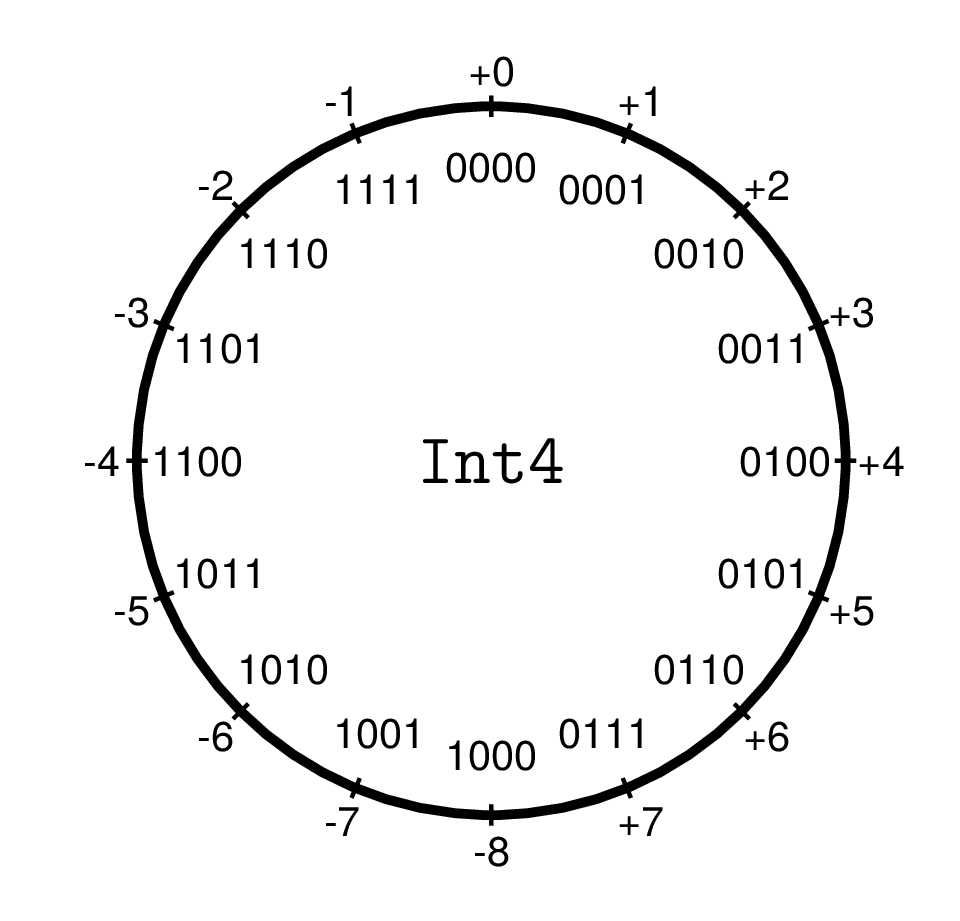
Integers are stored as fixed-length bit patterns. Therefore, the value range is finite. Within this value range addition, subtraction, multiplication, and integer division with remainder are exact operations without rounding errors.
Integer numbers come in two types: Signed and Unsigned, which can be viewed as machine models for ℤ and ℕ respectively.
UInts are binary numbers with a bit width of 8, 16, 32, 64, or 128 and the corresponding value range of \[
0 \le x < 2^n
\] They are used rarely in scientific computing. In low-level hardware programming, they are used, e.g., for handling binary data and memory addresses. By default, Julia displays them as hexadecimal numbers (with prefix 0x and digits 0-9a-f).
x =0x0033efef@show x typeof(x) Int(x)z =UInt(32)@show z typeof(z);
x = 0x0033efef
typeof(x) = UInt32
Int(x) = 3403759
z = 0x0000000000000020
typeof(z) = UInt64
For natural exponents, exponentiation by squaring is used, so for example x^23 requires only 7 multiplications: \[
x^{23} = \left( \left( (x^2)^2 \cdot x \right)^2 \cdot x \right)^2 \cdot x
\]
Division
Division / produces a floating-point number.
x =40/5
8.0
Integer Division and Remainder
The functions div(a,b), rem(a,b), and divrem(a,b) compute the quotient of integer division, the corresponding remainder, or both as a tuple.
For div(a,b) there is the operator form a ÷ b (input: \div<TAB>), and for rem(a,b) the operator form a % b.
By default, division uses “rounding toward zero”, so the corresponding remainder has the same sign as the dividend a:
A rounding rule other than RoundToZero can be specified as the third optional argument for these functions.
?RoundingMode shows the possible rounding modes.
For the rounding rule RoundDown (“toward minus infinity” – so that the corresponding remainder has the same sign as the divisor b), there are also the functions fld(a,b)(floored division) and mod(a,b):
Arbitrary precision arithmetic comes at a cost of significant memory and computation time.
We compare the time and memory requirements for summing 10 million integers as Int64 versus BigInt.
# 10^7 random numbers, uniformly distributed between -10^7 and 10^7 vec_int =rand(-10^7:10^7, 10^7)# The same numbers as BigIntsvec_bigint =BigInt.(vec_int)
Due to Julia’s just-in-time compilation, timing a single function call is not very informative. The BenchmarkTools package provides the @benchmark macro, which calls a function multiple times and displays the execution times as a histogram.
usingBenchmarkTools@benchmarksum($vec_int)
BenchmarkTools.Trial: 1793 samples with 1 evaluation per sample.
Range (min … max): 2.621 ms … 8.171 ms┊ GC (min … max): 0.00% … 0.00%
Time (median): 2.748 ms ┊ GC (median): 0.00%
Time (mean ± σ): 2.783 ms ± 288.289 μs┊ GC (mean ± σ): 0.00% ± 0.00%
▁▄▆█▆▆▅█▄▃▁
▃▃▄▇█████████████▇▆▆▄▅▄▄▃▃▃▃▃▃▃▃▂▂▂▁▁▂▂▂▂▂▂▁▁▁▁▁▁▁▁▂▁▁▂▁▁▁▂ ▄
2.62 ms Histogram: frequency by time 3.31 ms <
Memory estimate: 0 bytes, allocs estimate: 0.
@benchmarksum($vec_bigint)
BenchmarkTools.Trial: 69 samples with 1 evaluation per sample.
Range (min … max): 72.618 ms … 81.348 ms┊ GC (min … max): 0.00% … 0.00%
Time (median): 73.371 ms ┊ GC (median): 0.00%
Time (mean ± σ): 73.438 ms ± 1.062 ms┊ GC (mean ± σ): 0.00% ± 0.00%
▁ ▄▄█▄ ▁▁ ▁ ▁█▁ ▁▁▁ ▄▁▁▄ █ ▄▄
█▁████▆▆▁██▁▁▆█▁███▁███▁████▆▆▆█▆██▆▁▆▆▁▆▁▁▁▁▁▁▆▁▁▁▁▁▁▁▁▁▁▆ ▁
72.6 ms Histogram: frequency by time 74.6 ms <
Memory estimate: 72 bytes, allocs estimate: 3.
The BigInt addition is more than 30 times slower.
6.3 Floating-Point Numbers
In numerical mathematics, the term machine numbers is also commonly used.
6.3.1 Basic Idea
A “fixed number of digits before and after the decimal point” is unsuitable for many problems.
A separation between “significant digits” and magnitude (mantissa and exponent), as in scientific notation, is much more flexible. \[ 345.2467 \times 10^3\qquad 34.52467\times 10^4\qquad \underline{3.452467\times 10^5}\qquad 0.3452467\times 10^6\qquad 0.03452467\times 10^7\]
For uniqueness, one must choose one of these forms. In the mathematical analysis of machine numbers, one often chooses the form where the first digit after the decimal point is nonzero. Thus, for the mantissa \(m\): \[
1 > m \ge (0.1)_b = b^{-1},
\]
where \(b\) denotes the base of the number system.
We choose the form that corresponds to the actual implementation on the computer and specify: The representation with exactly one nonzero digit before the decimal point is the normalized representation. Thus, \[
(10)_b = b> m \ge 1.
\]
For binary numbers 1.01101, this digit is always equal to one, and one can omit storing this digit. This actually stored (shortened) mantissa we denote by \(M\), so that \[m = 1 + M\] holds.
NoteMachine Numbers
The set of machine numbers \(𝕄(b, p, e_{min}, e_{max})\) is characterized by the base \(b\), the mantissa length \(p\), and the value range of the exponent \(\{e_{min}, ... ,e_{max}\}\).
In our convention, the mantissa of a normalized machine number has one digit (of base \(b\)) before the decimal point and \(p-1\) digits after the decimal point.
If \(b=2\), one needs only \(p-1\) bits to store the mantissa of normalized floating-point numbers.
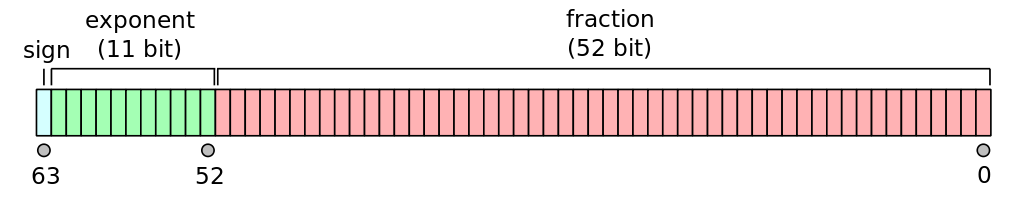
The IEEE 754 standard, implemented by most modern processors and programming languages, defines
11 bits for the exponent, thus \(0\le E \le 2047\)
The values \(E=0\) and \(E=(11111111111)_2=2047\) are reserved for encoding special values such as \(\pm0, \pm\infty\), NaN (Not a Number) and subnormal numbers.
52 bits for the (shortened) mantissa \(M,\quad 0\le M<1\), corresponding to approximately 16 decimal digits
Thus, the number represented is: \[ x=(-1)^S \cdot(1+M)\cdot 2^{E-1023}\]
functionprintbitsf64(x::Float64) s =bitstring(x)printstyled(s[1], color =:blue, reverse=true)printstyled(s[2:12], color =:green, reverse=true)printstyled(s[13:end], color=:red, bold=true, reverse=true)print("\n")endprintbitsf64(x)
and we can read S (blue), E (green), and M (red): \[
\begin{aligned}
S &= 0\\
E &= (10000000011)_2 = 2^{10} + 2^1 + 2^0 = 1027\\
M &= (.1011100100001)_2 = \frac{1}{2} + \frac{1}{2^3} + \frac{1}{2^4} + \frac{1}{2^5} + \frac{1}{2^8} + \frac{1}{2^{12}}\\
x &=(-1)^S \cdot(1+M)\cdot 2^{E-1023}
\end{aligned}
\]
… and thus reconstruct the number:
x = (1+1/2+1/8+1/16+1/32+1/256+1/4096) *2^4
27.56640625
The set of machine numbers 𝕄 forms a finite, discrete subset of ℝ. There exists a smallest and a largest machine number; all other elements x∈𝕄 have both a predecessor and successor in 𝕄.
What is the successor of x in 𝕄? To do this, we set the smallest mantissa bit from 0 to 1.
Converting a string of zeros and ones into the corresponding machine number:
Machine epsilon measures the relative distance between machine numbers and quantifies the statement: “64-bit floating-point numbers have a precision of approximately 16 decimal digits.”
Machine epsilon should not be confused with the smallest positive floating-point number:
floatmin(Float64)
2.2250738585072014e-308
Part of the literature uses a different definition of machine epsilon, which is half as large. \[
\epsilon' = \frac{\epsilon}{2}\approx 1.1\times 10^{-16}
\] This is the maximum relative error that can occur when rounding a real number to the nearest machine number.
Since numbers in the interval \((1-\epsilon',1+\epsilon']\) are rounded to the machine number \(1\), one can also define \(\epsilon'\) as: the largest number for which \(1+\epsilon' = 1\) still holds in machine arithmetic.
This allows to compute machine epsilon using the floating point arithmetic:
In the interval \([1,2)\) there are \(2^{52}\) equidistant machine numbers.
After that, the exponent increases by 1 and the mantissa \(M\) is reset to 0. Thus, the interval \([2,4)\) again contains \(2^{52}\) equidistant machine numbers, as does the interval \([4,8)\) up to \([2^{1023}, 2^{1024})\).
Likewise, in the intervals \(\ [\frac{1}{2},1), \ [\frac{1}{4},\frac{1}{2}),...\) there are \(2^{52}\) equidistant machine numbers each, down to \([2^{-1022}, 2^{-1021})\).
This forms the set \(𝕄_+\) of positive machine numbers, and we have \[
𝕄 = -𝕄_+ \cup \{0\} \cup 𝕄_+
\]
The largest and smallest positive representable normalized floating-point numbers of a floating-point type can be queried:
The map rd: ℝ \(\rightarrow\) 𝕄 should round to the nearest representable number.
Standard rounding mode is round to nearest, ties to even: when a value falls exactly midway between two machine numbers (tie), the one with 0 as its last mantissa bit is selected.
Justification: this way, we round up in 50% of the cases and down in 50% of the cases, thus avoiding a “statistical drift” in longer calculations.
It holds: \[
\frac{|x-\text{rd}(x)|}{|x|} \le \frac{1}{2} \epsilon
\]
6.6 Machine Number Arithmetic
The machine numbers, as a subset of ℝ, are not algebraically closed. Even the sum of two machine numbers is generally not representable as a machine number.
Important
The IEEE 754 standard requires that machine number arithmetic produces the rounded exact result:
The result must be equal to the one that would result from an exact execution of the corresponding operation followed by rounding. \[
a \oplus b = \text{rd}(a + b)
\] The same must hold for the implementation of standard functions such as sqrt(), log(), sin(), … – they also return the machine number closest to the exact result.
Arithmetic is not associative:
1+10^-16+10^-16
1.0
1+ (10^-16+10^-16)
1.0000000000000002
In the first case (without parentheses), evaluation proceeds from left to right: \[
\begin{aligned}
1 \oplus 10^{-16} \oplus 10^{-16} &=
(1 \oplus 10^{-16}) \oplus 10^{-16} \\ &=
\text{rd}\left(\text{rd}(1 + 10^{-16}) + 10^{-16} \right)\\
&= \text{rd}(1 + 10^{-16})\\
&= 1
\end{aligned}
\]
In the second case, one obtains: \[
\begin{aligned}
1 \oplus \left(10^{-16} \oplus 10^{-16}\right) &=
\text{rd}\left(1 + \text{rd}(10^{-16} + 10^{-16}) \right)\\
&= \text{rd}(1 + 2*10^{-16})\\
&= 1.0000000000000002
\end{aligned}
\]
One should also remember that even “simple” decimal fractions cannot always be represented exactly as machine numbers:
When outputting a machine number, the binary fraction must be converted to a decimal fraction. Julia can display more digits of this decimal fraction expansion:
usingPrintf@printf("%.30f", 0.1)
0.100000000000000005551115123126
@printf("%.30f", 0.3)
0.299999999999999988897769753748
The binary fraction mantissa of a machine number can have a long or even infinitely periodic decimal expansion. But one should not be misled into thinking that this is “higher precision”!
Important
Key message: When testing Floats for equality, one should almost always define a realistic tolerance epsilon appropriate to the problem and test:
epsilon =1.e-10ifabs(x-y) < epsilon# ...end
6.7 Normalized and Subnormal Machine Numbers
The gap between zero and the smallest normalized machine number \(2^{-1022} \approx 2.22\times 10^{-308}\) is filled with subnormal machine numbers.
Let’s look at a simple model:
Let 𝕄(10,4,±5) be the set of machine numbers to base 10 with 4 mantissa digits (one before the decimal point, 3 after) and the exponent range -5 ≤ E ≤ 5.
Then the normalized representation (nonzero leading digit) of e.g. 1234.0 is 1.234e3 and of 0.00789 is 7.890e-3.
It is essential that machine numbers remain normalized at each computation step. Only then is the full mantissa length utilized, maximizing accuracy.
The smallest positive normalized number in our model is x = 1.000e-5. Already x/2 would have to be rounded to 0.
But for many applications, it is advantageous to allow also subnormal numbers and represent x/2 as 0.500e-5 or x/20 as 0.050e-5.
This gradual underflow is of course associated with a loss of significant digits and thus accuracy.
In the Float data type, such subnormal values are represented by an exponent field in which all bits are equal to zero:
usingPrintfx =2*floatmin(Float64) # 2*smallest normalized floating-point number > 0while x !=0 x /=2@printf"%14.6g " xprintbitsf64(x)end
NaN(Not a Number) represents the result of an undefined operation. All further operations with NaN also result in NaN.
0/0, Inf-Inf, 2.3NaN, sqrt(NaN)
(NaN, NaN, NaN, NaN)
Since NaN represents an undefined value, it is not equal to anything, not even to itself. This is sensible, because if two variables x and y are computed as NaN, one should not conclude that they are equal.
There is therefore a boolean function isnan() to test for NaN.
x =0/0y =Inf-Inf@show x==y NaN==NaNisfinite(NaN) isinf(NaN) isnan(x) isnan(y);
x == y = false
NaN == NaN = false
isfinite(NaN) = false
isinf(NaN) = false
isnan(x) = true
isnan(y) = true
There is a “minus zero”. It signals a numerical underflow of a small negative quantity.
Also worth noting is atan(y, x), the two-argument arctangent (known as atan2 in many programming languages, see atan2). This solves the problem of converting from Cartesian to polar coordinates without awkward case distinctions.
atan(y,x) is the angle of the polar coordinates of (x,y) in the interval \((-\pi,\pi]\). In the 1st and 4th quadrants, it is therefore equal to atan(y/x)