subtypes(Int64)Type[]One can write extensive programs in Julia without using a single type declaration. This is, of course, intentional and designed to simplify users’ work.
However, for a deeper understanding we will now examine the underlying type system.
The type system has the structure of a tree whose root is the type Any. The functions subtypes() and supertype() can be used to explore the tree. subtypes() displays all child nodes, while supertype() shows the parent.
subtypes(Int64)Type[]The result is an empty list of types. Int64 is a so-called concrete type with no subtypes.
Let’s now traverse this branch upward to the root (in computer science, trees are typically inverted).
supertype(Int64)Signedsupertype(Signed)Integersupertype(Integer)Realsupertype(Real)Numbersupertype(Number)AnyThis would have been faster, by the way: The function supertypes() (with plural-s) shows all ancestors.
supertypes(Int64)(Int64, Signed, Integer, Real, Number, Any)We can now examine the nodes:
A simple recursive function can display the entire subtree:
Below is the same hierarchy as an image (made with LaTeX/TikZ):
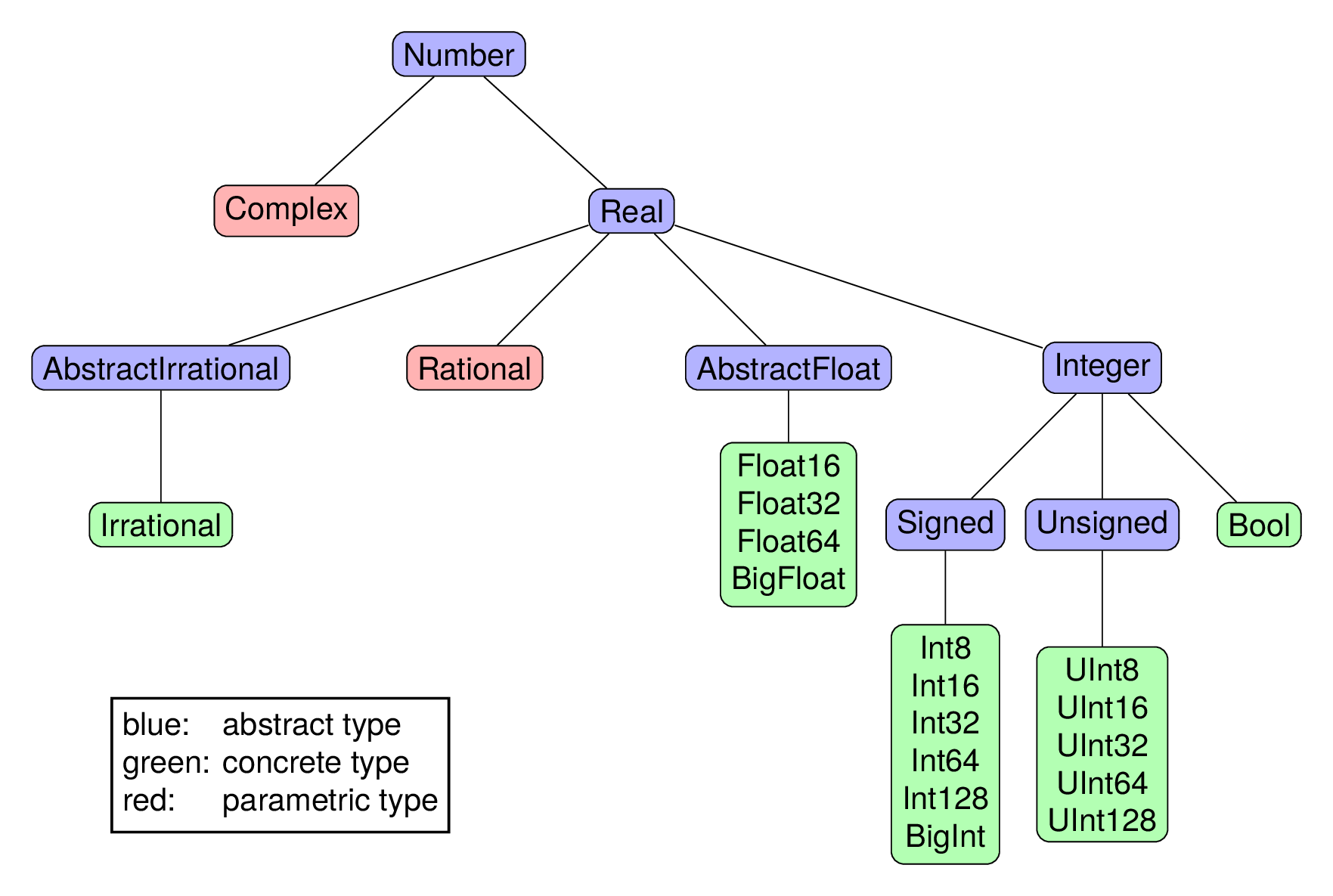
Beyond numeric types, Julia includes many others. The number of direct descendants (children) of Any is
length(subtypes(Any))604This number increases with (almost) every package loaded via using ....
To declare and test the relationships in the type hierarchy, Julia provides a special operator:
Int64 <: NumbertrueTo test whether an object has a certain type (or an abstract supertype of it), isa(object, typ) is used. It is usually used in infix form and reads as the question is x a T?.
x = 17.2

42 isa Int64,  42 isa Real,  x isa Real,   x isa Float64,   x isa Integer
(true, true, true, true, false)Since abstract types do not define data structures, they are simple to define. Either they are derived directly from Any:
abstract type MySuperType end

supertype(MySuperType)Anyor from another abstract type:
abstract type MySpecialNumber <: Integer end

supertypes(MySpecialNumber)
(MySpecialNumber, Integer, Real, Number, Any)By this definition, the abstract type is attached at a specific point in the type tree.
Bool and IrrationalThough appearing in the numeric type tree, these types warrant brief explanation:
Bool is numeric in the sense that true=1, false=0:
true + true + true, false - true, sqrt(true), true/4(3, -1, 1.0, 0.25)Irrational is the type of certain predefined constants, such as π and ℯ. According to the documentation, Irrational is a “Number type representing an exact irrational value, which is automatically rounded to the correct precision in arithmetic operations with other numeric quantities”.
When the tree structure is insufficient, abstract types can be defined as a union of arbitrary (abstract and concrete) types.
IntOrString = Union{Int64,String}Union{Int64, String}The command methods(<) reveals over 70 methods for the comparison operator, including methods with union type arguments, such as:
<(x::Union{Float16, Float32, Float64}, y::BigFloat)a method comparing fixed-width machine numbers with arbitrary precision numbers.
structA struct defines a concrete type as a collection of named fields.
abstract type Point end

mutable struct Point2D <: Point
    x :: Float64
    y :: Float64
end

mutable struct Point3D <: Point
    x :: Float64
    y :: Float64
    z :: Float64
end
As seen with expressions like x = Int8(33), type names can serve as constructors:
p1 = Point2D(1.4, 3.5)Point2D(1.4, 3.5)p1 isa Point3D, p1 isa Point2D, p1 isa Point(false, true, true)The fields of a struct are accessed by name using the . operator.
p1.y3.5Because we declared our struct as mutable, we can modify the object p1 by assigning new values to the fields.
p1.x = 3333.4
p1
Point2D(3333.4, 3.5)The dump() function displays structure information for types and objects.
dump(Point3D)mutable struct Point3D <: Point
x::Float64
y::Float64
z::Float64 dump(p1)Point2D
x: Float64 3333.4
y: Float64 3.5In classical object-oriented languages (C++, Java, Python), methods are bound to objects.
Julia takes a different approach: methods belong to functions, not to objects. Constructors (functions sharing a type’s name that create instances of that type) are the only exception.
When we define a new type, we can define functions specific to that type but we can also add additional methods to existing functions.
We define a distance function with two methods:
function distance(p1::Point2D, p2::Point2D)
    sqrt((p1.x-p2.x)^2 + (p1.y-p2.y)^2)
end

function distance(p1::Point3D, p2::Point3D)
    sqrt((p1.x-p2.x)^2 + (p1.y-p2.y)^2 + (p1.z-p2.z)^2)
end
distance (generic function with 2 methods)distance(p1, Point2D(2200, -300))1173.3319266090054As mentioned earlier, methods() shows the method table of a function:
methods(distance)The @which macro, applied to a function call with concrete arguments, shows which method is selected for these arguments:
@which sqrt(3.3)z = "Hello" * '!'
println(z)
@which "Hello" * '!'Hello!Methods can also have abstract types as arguments:
"""
  Calculate the angle ϕ (in degrees) of the polar coordinates (2D) or
    spherical coordinates (3D) of a point
"""
function phi_angle(p::Point)
    atand(p.y, p.x)
end

phi_angle(p1)0.0601593431937626Text enclosed in triple quotes immediately before the function definition is automatically integrated into Julia’s help database:
?phi_anglesearch: phi_angle angle
Calculate the angle ϕ (in degrees) of the polar coordinates (2D) or spherical coordinates (3D) of a point
With multiple dispatch, the method is applied that is the most specific among all matching ones. Here is a function with several methods (all but the last written in short assignment form):
f(x::String, y::Number)  = "Args: String + Number"
f(x::String, y::Int64)   = "Args: String + Int64"
f(x::Number, y::Int64)   = "Args: Number + Int64"
f(x::Int64,  y:: Number) = "Args: Int64  + Number"
f(x::Number)             = "Arg: a Number"

function f(x::Number, y::Number, z::String)
    return "Arg: 2 × Number + String"
end
f (generic function with 6 methods)The first two methods match; the second is chosen as it is more specific (Int64 <: Number):
f("Hello", 42)"Args: String + Int64"Ambiguities may arise if methods are defined poorly:
f(42, 42)MethodError: f(::Int64, ::Int64) is ambiguous.
Candidates:
f(x::Int64, y::Number)
@ Main.Notebook ~/Julia/Book26/JuliaBook/chapters/types.qmd:322
f(x::Number, y::Int64)
@ Main.Notebook ~/Julia/Book26/JuliaBook/chapters/types.qmd:321
Possible fix, define
f(::Int64, ::Int64)
Stacktrace:
[1] top-level scope
@ ~/Julia/Book26/JuliaBook/chapters/types.qmd:336
Error showing value of type MethodError
StackOverflowError:
Stacktrace:
[1] show(io::IOContext{IOBuffer}, x::MethodError) (repeats 79983 times)
@ Main.Notebook ~/Julia/Book26/JuliaBook/chapters/types.qmd:25Rational and Complex// as an infix constructor:@show Rational(23, 17) 4//16 + 1//3;Rational(23, 17) = 23//17
4 // 16 + 1 // 3 = 7//12im@show Complex(0.4) 23 + 0.5im/(1-2im);Complex(0.4) = 0.4 + 0.0im
23 + (0.5im) / (1 - 2im) = 22.8 + 0.1imLike Point2D, both Rational and Complex consist of two fields: numerator and denominator or real and imaginary parts.
However, the type of these fields is not completely fixed. Rational and Complex are parametric types.
x = 2//7
@show typeof(x);
typeof(x) = Rational{Int64}y = BigInt(2)//7
@show typeof(y) y^48;typeof(y) = Rational{BigInt}
y ^ 48 = 281474976710656//36703368217294125441230211032033660188801x = 1 + 2im
typeof(x)Complex{Int64}y = 1.0 + 2.0im
typeof(y)ComplexF64 (alias for Complex{Float64})The concrete types Rational{Int64}, Rational{BigInt},…, Complex{Int64}, Complex{Float64}},… are subtypes of Rational and Complex, respectively.
Rational{BigInt} <: RationaltrueThe definitions look roughly like this:
struct MyComplex{T<:Real} <: Number
    re::T
    im::T
end

struct MyRational{T<:Integer} <: Real
    num::T
    den::T
end
The first definition says:
MyComplex has two fields re and im, both of the same type T.T must be a subtype of Real.MyComplex and all its variants like MyComplex{Float64} are subtypes of Number.and the second says analogously:
MyRational has two fields num and den, both of the same type T.T must be a subtype of Integer.MyRational and its variants are subtypes of Real.Since ℚ\(\subset\) ℝ (or Rational <: Real in Julia notation), the components of a complex number can also be rational:
z = 3//4 + 5im
dump(z)
Complex{Rational{Int64}}
re: Rational{Int64}
num: Int64 3
den: Int64 4
im: Rational{Int64}
num: Int64 5
den: Int64 1These structures are declared without the mutable attribute, making them immutable:
x = 2.2 + 3.3im
println("The real part is: $(x.re)")

x.re = 4.4
The real part is: 2.2
setfield!: immutable struct of type Complex cannot be changed
Stacktrace:
[1] setproperty!(x::ComplexF64, f::Symbol, v::Float64)
@ Base ./Base_compiler.jl:58
[2] top-level scope
@ ~/Julia/Book26/JuliaBook/chapters/types.qmd:426
Error showing value of type ErrorException
StackOverflowError:
Stacktrace:
[1] show(io::IOContext{IOBuffer}, x::ErrorException) (repeats 79983 times)
@ Main.Notebook ~/Julia/Book26/JuliaBook/chapters/types.qmd:25This is standard practice. The object 9 (of type Int64) is also immutable. The following, of course, still works:
x += 2.24.4 + 3.3imHere, a new object of type Complex{Float64} is created and x then references this new object.
The type system’s flexibility invites experimentation. Here we define a struct that can contain either a machine number or a pair of integers:
struct MyParms{T <: Union{Float64, Tuple{Int64, Int64}}}
    param::T
end

p1 = MyParms(33.3)
p2 = MyParms( (2, 4) )

@show p1.param  p2.param;
p1.param = 33.3
p2.param = (2, 4)Types are also objects. Each type is an instance of one of three “meta-types”:
Union (union types)UnionAll (parametric types)DataType (all concrete and other abstract types)@show 23779 isa Int64 Int64 isa DataType;23779 isa Int64 = true
Int64 isa DataType = true@show 2im isa Complex Complex isa UnionAll;2im isa Complex = true
Complex isa UnionAll = true@show 2im isa Complex{Int64} Complex{Int64} isa DataType;2im isa Complex{Int64} = true
Complex{Int64} isa DataType = trueThese three concrete “meta-types” are, by the way, subtypes of the abstract “meta-type” Type.
subtypes(Type)4-element Vector{Any}:
Core.TypeofBottom
DataType
Union
UnionAllx3 = Float64
@show x3(4) x3 <: Real x3==Float64 ;x3(4) = 4.0
x3 <: Real = true
x3 == Float64 = trueThis demonstrates that Julia’s style guidelines such as “Types and type variables start with uppercase letters, other variables and functions are written in lowercase.” are conventions, not language-enforced rules.
They should still be followed for readability.
Declaring such assignments with const creates a type alias.
const MyCmplxF64 = MyComplex{Float64}

z = MyCmplxF64(1.1, 2.2)
typeof(z)MyComplex{Float64}function myf(x, S, T)
if S <: T
println("$S is subtype of $T")
end
return S(x)
end
z = myf(43, UInt16, Real)
@show z typeof(z);UInt16 is subtype of Real
z = 0x002b
typeof(z) = UInt16To define this function with type signatures, we can write
function myf(x, S::Type, T::Type) ... endHowever, the (equivalent) special syntax
function myf(x, ::Type{S}, ::Type{T}) where {S,T} ... endis more common. Here we can also impose restrictions on the permissible values of the type variables S and T in the where clause.
How can we define a special method of myf that should only be called when S and T are equal to Int64? This is possible as follows:
function myf(x, ::Type{Int64}, ::Type{Int64}) ... endType{Int64} acts like a “meta-type”, whose only instance is the type Int64.
<:(T1, T2), supertype(T), supertypes(T), subtypes(T). Other useful operations include typejoin(T1,T2) (next common ancestor in the type tree) and tests like isconcretetype(T), isabstracttype(T), isstructtype(T).Can non-concrete types also be used as parameters in parametric types? Are there Complex{AbstractFloat} or Complex{Union{Float32, Int16}}?
Yes, such types exist. They are concrete, and objects can be instantiated.
z5 = Complex{Integer}(2, 0x33)
dump(z5)
Complex{Integer}
re: Int64 2
im: UInt8 0x33This is a heterogeneous composite type. Each component has an individual type T, for which T<:Integer holds.
Note that
Int64 <: Integertruebut it does not hold that
Complex{Int64} <: Complex{Integer}falseThese types are both concrete. Therefore, they cannot stand in a sub/supertype relation to each other in Julia’s type hierarchy. Julia’s parametric types are in theoretical computer science terminology, invariant. (If S<:T implied ParamType{S} <: ParamType{T}, this would be covariance.)
The usual (and in many cases recommended!) programming style in Julia is writing generic functions:
function fmm(x, y)
    return x * x * y
end
fmm (generic function with 1 method)This function works with any types supporting the required operations.
fmm( Complex(2,3), 10), fmm("Hello", '!')(-50 + 120im, "HelloHello!")Type annotations can restrict applicability or implement different methods for different types:
function fmm2(x::Number, y::AbstractFloat)
    return x * x * y
end

function fmm2(x::String, y::String)
    println("Sorry, I don't take strings!")
end


@show fmm2(18, 2.0)   fmm2(18, 2);
fmm2(18, 2.0) = 648.0
MethodError: no method matching fmm2(::Int64, ::Int64)
The function `fmm2` exists, but no method is defined for this combination of argument types.
Closest candidates are:
fmm2(::Number, ::AbstractFloat)
@ Main.Notebook ~/Julia/Book26/JuliaBook/chapters/types.qmd:596
fmm2(::String, ::String)
@ Main.Notebook ~/Julia/Book26/JuliaBook/chapters/types.qmd:600
Stacktrace:
[1] top-level scope
@ ~/Julia/Book26/JuliaBook/chapters/types.qmd:605Explicit type annotations are almost always irrelevant for the speed of the code!
This is one of the most important advantages of Julia.
Once a function is called for the first time with certain types, a specialized form of the function is generated and compiled for these argument types. Thus, generic functions are usually just as fast as the specialized functions one writes in other languages.
Generic functions enable seamless integration across packages and support high-level abstraction.
A simple example: The Measurements.jl package defines a new data type Measurement, a value with error, and the arithmetic of this type. Thus, generic functions work automatically:
using Measurements

x = 33.56±0.3
y = 2.3±0.02

fmm(x, y)
2590.0 ± 52.0where ClauseWe want to write a function that works for all complex integers (and only these), e.g., an implementation of prime factorization in ℤ[i]. The definition
function isprime(x::Complex{Integer}) ... enddoes not give the desired result, as we saw in Section 8.9. The function would not work for an argument of type Complex{Int64}, since the latter is not a subtype of Complex{Integer}.
We must introduce a type variable. The where clause serves this purpose.
function isprime(x::Complex{T}) where {T<:Integer}
     ...
end
This is to be read as:
“The argument
xshould be one of the typesComplex{T}, where the type variableTcan be any subtype ofInteger.”
Another example:
function kgV(x::Complex{T}, y::Complex{S}) where {T<:Integer, S<:Integer}
     ...
end
The arguments x and y can have different types, each a subtype of
Integer.
If there is only one where clause as in the last example, one can omit the curly braces and write
function isprime(x::Complex{T}) where T<:Integer
     ...
end
This can still be shortened to
function isprime(x::Complex{<:Integer})
     ...
end
These different variants can be confusing, but it is only syntax.
C1 = Complex{T} where {T<:Integer}
C2 = Complex{T} where T<:Integer
C3 = Complex{<:Integer}

C1 == C2 == C3trueShort syntax for simple cases; extended syntax for complex variants.
Finally, note that where T is shorthand for where T<:Any, which introduces a completely unrestricted type variable. Thus, something like this is possible:
function fgl(x::T, y::T) where T
    println("Congratulations! x and y are of the same type!")
end
fgl (generic function with 1 method)This method requires that both arguments have exactly the same type; otherwise, any type is accepted.
fgl(33, 44)Congratulations! x and y are of the same type!fgl(33, 44.0)MethodError: no method matching fgl(::Int64, ::Float64)
The function `fgl` exists, but no method is defined for this combination of argument types.
Closest candidates are:
fgl(::T, ::T) where T
@ Main.Notebook ~/Julia/Book26/JuliaBook/chapters/types.qmd:729
Stacktrace:
[1] top-level scope
@ ~/Julia/Book26/JuliaBook/chapters/types.qmd:741
Error showing value of type MethodError
StackOverflowError:
Stacktrace:
[1] show(io::IOContext{IOBuffer}, x::MethodError) (repeats 79983 times)
@ Main.Notebook ~/Julia/Book26/JuliaBook/chapters/types.qmd:25