function hyp(x,y)
    sqrt(x^2+y^2)
end
hyp (generic function with 1 method)Functions process their arguments to produce and return a result when called.
I. Block form: function ... end
function hyp(x,y)
sqrt(x^2+y^2)
endhyp (generic function with 1 method)hyp(x, y) = sqrt(x^2 + y^2)hyp (generic function with 1 method)(x, y) -> sqrt(x^2 + y^2)#2 (generic function with 1 method)return Statementreturn, function execution terminates and control returns to the calling context.return, the value of the last expression is returned as the function value.The two definitions
function xsinrecipx(x)
    if x == 0
        return 0.0
    end
    return x * sin(1/x)
end
and the equivalent version without explicit return in the last line:
function xsinrecipx(x)
    if x == 0
        return 0.0
    end
    x * sin(1/x)
end
are therefore equivalent.
nothing (void functions in C) returns a nothing value of type Nothing. (Just as a Bool object has two values, true and false, a Nothing object has only one: nothing.)return statement is equivalent to return nothing.function fn(x)
println(x)
return
end
a = fn(2)2a@show a typeof(a);a = nothing
typeof(a) = NothingThe single-liner form looks like a simple assignment:
hyp(x, y) = sqrt(x^2 + y^2)Julia provides two ways to combine multiple statements into a block that can stand in place of a single statement:
begin ... end blockIn both cases, the value of the block is the value of the last statement.
Thus, the following also works:
hyp(x, y) = (z = x^2; z += y^2; sqrt(z))and
hyp(x, y) = begin
                z = x^2
                z += y^2
                sqrt(z)
endAnonymous functions can be “rescued from anonymity” by assigning them a name:
hyp = (x,y) -> sqrt(x^2 + y^2)Their actual application is in calling a (higher order) function that expects a function as an argument.
Typical applications include map(f, collection), which applies a function to every element of a collection. Julia also supports map(f, collection1, collection2) with multiple collections:
map( (x,y) -> sqrt(x^2 + y^2), [3, 5, 8], [4, 12, 15])3-element Vector{Float64}:
5.0
13.0
17.0map( x->3x^3, 1:8 )8-element Vector{Int64}:
3
24
81
192
375
648
1029
1536Another example is filter(test, collection), where a test is a function that returns a Bool.
filter(x -> ( x%3 == 0 && x%5 == 0), 1:100 )6-element Vector{Int64}:
15
30
45
60
75
90Vector or Array).V = [1, 2, 3]
W = fill!(V, 17)
# '===' tests for identity
@show V W V===W; # V and W refer to the same objectV = [17, 17, 17]
W = [17, 17, 17]
V === W = truefunction fill_first!(V, x)
V[1] = x
return V
end
U = fill_first!(V, 42)
@show V U V===U;V = [42, 17, 17]
U = [42, 17, 17]
V === U = truefa(x, y=42; a) = println("x=$x, y=$y, a=$a")
fa(6, a=4, 7)
fa(6, 7; a=4)
fa(a=-2, 6)x=6, y=7, a=4
x=6, y=7, a=4
x=6, y=42, a=-2A function with only keyword arguments is declared as follows:
fkw(; x=10, y) = println("x=$x, y=$y")

fkw(y=2)
x=10, y=2f2 = sqrt
f2(2)1.4142135623730951# naive Riemann integration example
function Riemann_integrate(f, a, b; NInter=1000)
delta = (b-a)/NInter
s = 0
for i in 0:NInter-1
s += delta * f(a + delta/2 + i * delta)
end
return s
end
Riemann_integrate(sin, 0, π)2.0000008224672694function generate_add_func(x)
function addx(y)
return x+y
end
return addx
endgenerate_add_func (generic function with 1 method)h = generate_add_func(4)(::Main.Notebook.var"#addx#generate_add_func##0"{Int64}) (generic function with 1 method)h(1)5h(2), h(10)(6, 14)The above function generate_add_func() can also be defined more briefly. The inner function name addx is local and inaccessible outside. An anonymous function can be used instead.
generate_add_func(x) = y -> x + ygenerate_add_func (generic function with 1 method)|>\circ + Tab)\[(f\circ g)(x) = f(g(x))\]
(sqrt ∘ + )(9, 16)5.0f = cos ∘ sin ∘ (x->2x)
f(.2)0.9251300429004277@show map(uppercase ∘ first, ["one", "a", "green", "leaves"]);map(uppercase ∘ first, ["one", "a", "green", "leaves"]) = ['O', 'A', 'G', 'L']25 |> sqrt5.01:10 |> sum |> sqrt7.416198487095663["a", "list", "of", "strings"] .|> [length, uppercase, reverse, titlecase]4-element Vector{Any}:
1
"LIST"
"fo"
"Strings"do NotationA syntactic peculiarity for defining anonymous functions as arguments of other functions is the do notation.
Let higherfunc(f, a, ...) be a function whose first argument is a function.
The function can be called without the first argument, with the function body defined in a following do block:
higherfunc(a, b) do x, y
   body of f(x,y)
end
Using Riemann_integrate() as an example, this looks like this:
# this is the same as Riemann_integrate(x->x^2, 0, 2)

Riemann_integrate(0, 2) do x x^2 end2.6666659999999993The do notation is especially useful for complex function bodies, such as this integrand defined in multiple steps:
r = Riemann_integrate(0, π) do x
        z1 = sin(x)
        z2 = log(1+x)
        if x > 1
            return z1^2
        else
            return 1/z2^2
        end
end1578.9022037353475By defining a method for a type, objects become callable like functions.
# struct stores coefficients of a second-degree polynomial
struct Poly2Grad
    a0::Float64
    a1::Float64
    a2::Float64
end

p1 = Poly2Grad(2,5,1)
p2 = Poly2Grad(3,1,-0.4)
Poly2Grad(3.0, 1.0, -0.4)The following method makes this structure callable:
function (p::Poly2Grad)(x)
    p.a2 * x^2 + p.a1 * x + p.a0
end
Objects can now be used like functions:
@show p2(5) p1(-0.7) p1;p2(5) = -2.0
p1(-0.7) = -1.0100000000000002
p1 = Poly2Grad(2.0, 5.0, 1.0)+, *, >, ∈ are functions.+(3, 7)10f = ++ (generic function with 191 methods)f(3, 7)10x[i], a.x, [x; y] are converted by the parser to function calls.| x[i] | getindex(x, i) |
| x[i] = z | setindex!(x, z, i) |
| a.x | getproperty(a, :x) |
| a.x = z | setproperty!(a, :x, z) |
| [x; y;…] | vcat(x, y, …) |
(The colon before a variable makes it into a symbol.)
For these functions, too, van be extended/overwritten by new methods. For example, for a custom type, setting a field (setproperty!()) could check the validity of the value or trigger further actions.
In principle, get/setproperty can also do things that have nothing to do with an actually existing field of the structure.
All arithmetic infix operators have an update form: The expression
x = x ⊙ ycan also be written as
x ⊙= yBoth forms are semantically equivalent: a new object created on the right is assigned to x.
Memory- and time-efficient in-place updates of arrays use explicit indexing:
for i in eachindex(x)
    x[i] += y[i]
end
or semantically equivalent broadcast form (see Section 12.7):
x .= x .+ yExpressions like
-2^3+500/2/10==8 && 13 > 7 + 1 || 9 < 2falseare converted by the parser into a tree structure:
using TreeView

walk_tree(Meta.parse("-2^3+500/2/10==8 && 13 > 7 + 1 || 9 < 2"))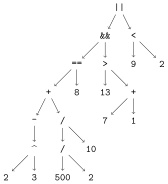
Error showing value of type TreeView.LabelledTree
StackOverflowError:
Stacktrace:
 [1] show(io::IOContext{IOBuffer}, x::LabelledTree) (repeats 79983 times)
@ Main.Notebook ~/Julia/Book26/JuliaBook/chapters/9_functs.qmd:26Addition/subtraction and multiplication/division have equal precedence and are left-associative (evaluated left-to-right):
200/5/2 # evaluated left to right as (200/5)/220.0200/2*5 # evaluated left to right as (200/2)*5500.0Assignments like =, +=, *=,… are of equal rank and right-associative.
x = 1
y = 10

# evaluated right to left:  x += (y += (z = (a = 20)))

x += y +=  z = a = 20

@show x y z a;
x = 31
y = 30
z = 20
a = 20Julia provides functions to query associativity. These functions are not exported from Base, so the module name must be specified.
for i in (:/, :+=, :(=), :^)
    a = Base.operator_associativity(i)
    println("Operation $i is  $(a)-associative")
end
Operation / is left-associative
Operation += is right-associative
Operation = is right-associative
Operation ^ is right-associativeThus, the power operator is right-associative:
2^3^2 # right-associative, = 2^(3^2)512for i in (:+, :-, :*, :/, :^, :(=))
p = Base.operator_precedence(i)
println("Precedence of $i = $p")
endPrecedence of + = 11
Precedence of - = 11
Precedence of * = 12
Precedence of / = 12
Precedence of ^ = 15
Precedence of = = 1^ has higher precedence.# assignment has smallest precedence, therefore evaluation as x = (3 < 4)
x = 3 < 4
xtrue(y = 3) < 4 # parentheses override any precedence
y3Returning to the example above:
-2^3+500/2/10==8 && 13 > 7 + 1 || 9 < 2falsefor i ∈ (:^, :+, :/, :(==), :&&, :>, :|| )
print(i, " ")
println(Base.operator_precedence(i))
end^ 15
+ 11
/ 12
== 7
&& 6
> 7
|| 5These rules evaluate the expression as:
((-(2^3)+((500/2)/10)==8) && (13 > (7 + 1))) || (9 < 2)false(as shown in the parse tree above).
So the precedence is:
Power > Multiplication/Division > Addition/Subtraction > Comparisons > logical && > logical || > assignment
Thus, an expression like
a = x <= y + z && x > z/2 is sensibly evaluated as a = ((x <= (y+z)) && (x < (z/2)))
A special case is still
+ and - as signs* symbolBoth have precedence even before multiplication and division.
Therefore, the meaning of expressions changes when one applies juxtaposition:
1/2*π, 1/2π(1.5707963267948966, 0.15915494309189535)Compared to the power operator ^ (see https://discourse.julialang.org/t/confused-about-operator-precedence-for-2-3x/8214/7 ):
Unary operators, including juxtaposition, bind tighter than ^ on the right but looser on the left.
Examples:
-2^2 # -(2^2)-4x = 5
2x^2 # 2(x^2)502^-2 # 2^(-2)0.252^2x # 2^(2x)1024f(...) has precedence over all operatorssin(x)^2 === (sin(x))^2 # not sin(x^2)trueThe Julia parser assigns precedence to numerous Unicode characters in advance, so that these characters can be used as operators by packages and self-written code.
Thus, for example,
∧ ⊗ ⊘ ⊙ ⊚ ⊛ ⊠ ⊡ ⊓ ∗ ∙ ∤ ⅋ ≀ ⊼ ⋄ ⋆ ⋇ ⋉ ⋊ ⋋ ⋌ ⋏ ⋒ ⟑ ⦸ ⦼ ⦾ ⦿ ⧶ ⧷ ⨇ ⨰ ⨱ ⨲ ⨳ ⨴ ⨵ ⨶ ⨷ ⨸ ⨻ ⨼ ⨽ ⩀ ⩃ ⩄ ⩋ ⩍ ⩎ ⩑ ⩓ ⩕ ⩘ ⩚ ⩜ ⩞ ⩟ ⩠ ⫛have precedence 12 like multiplication/division (and are left-associative like these) and for example
⊕ ⊖ ⊞ ⊟ |++| ∪ ∨ ⊔ ± ∓ ∔ ∸ ≏ ⊎ ⊻ ⊽ ⋎ ⋓ ⧺ ⧻ ⨈ ⨢ ⨣ ⨤ ⨥ ⨦ ⨧ ⨨ ⨩ ⨪ ⨫ ⨬ ⨭ ⨮ ⨹ ⨺ ⩁ ⩂ ⩅ ⩊ ⩌ ⩏ ⩐ ⩒ ⩔ ⩖ ⩗ have precedence 11 like addition/subtraction.